
The short answer: No, a free @gmail.com address is not HIPAA compliant — not even a little, not even with a really strong password. If you're emailing clients from one, you're taking on legal risk you probably didn't sign up for. The good news? Fixing it is easier (and cheaper) than you think, and it comes with a nice branding upgrade for your practice.
Let's walk through why, what could actually happen, and your best options.
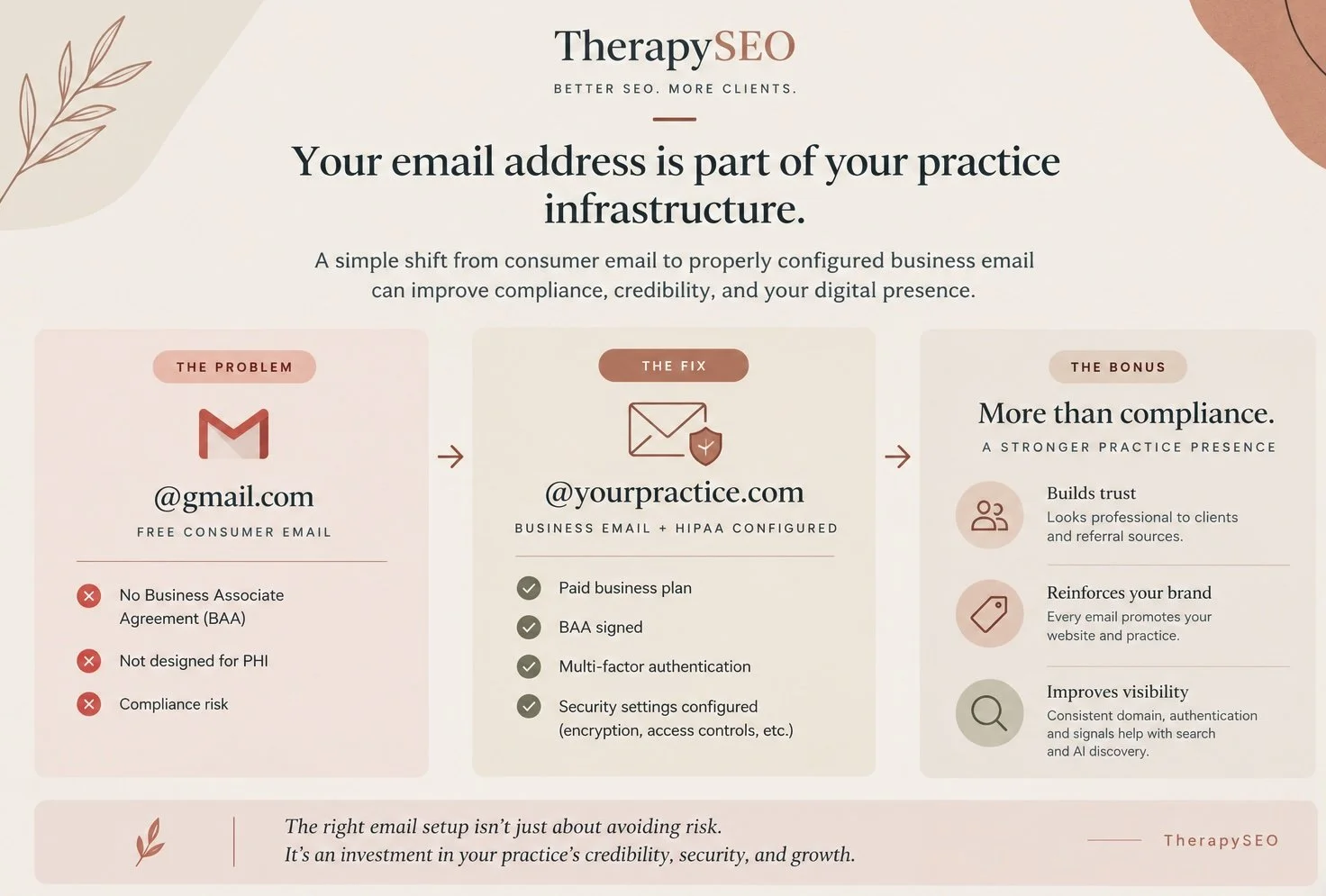
Why Free Gmail Is Not HIPAA Compliant
You became a therapist to help people, not to memorize federal privacy law. So here's the plain-English version.
HIPAA requires that any vendor handling protected health information (PHI) on your behalf — and yes, your email provider counts — signs a Business Associate Agreement (BAA). A BAA is a contract in which the vendor agrees to protect your clients' PHI according to HIPAA's rules.
Google does not offer a BAA for free Gmail accounts. That means the moment a client emails you about rescheduling "because my panic attacks have been worse," PHI is now sitting in a non-compliant inbox.
And email with clients almost always contains PHI, even when it feels harmless. A client's name plus the fact that they see a therapist is protected health information. "See you Tuesday at 3" from yourtherapist@gmail.com? That's PHI.
Free consumer email also lacks other safeguards HIPAA expects: guaranteed encryption in transit and at rest, access controls, and audit trails that track who accessed what. (Headway has a solid overview.)
What's the Actual Risk? (HIPAA Penalties for Therapists)
I know what some of you are thinking: "Is anyone really coming after a solo practice over email?" Fair question. Here's the honest answer.
HIPAA violations are enforced by the HHS Office for Civil Rights (OCR), typically triggered by a complaint or a breach report. Civil penalties are tiered by culpability, currently ranging from $145 per violation on the low end to an annual cap of over $2.1 million for willful neglect that goes uncorrected (HIPAA Journal).
If your email account is compromised: a phishing link, a stolen laptop, a reused password, every client message in that inbox is potentially a reportable breach. Under the Breach Notification Rule, you'd need to notify every affected client and HHS, generally within 60 days.
Now imagine drafting that letter to your therapy clients, about their confidential information. The fine might sting, but the damage to trust is the part that can undermine a therapeutic relationship.
HIPAA Compliant Email Options for Therapists
Here's the part where it gets better: you have several good options, and most cost less per month than a single fancy latte habit.
Google Workspace (My Pick)
If you like Gmail, you can keep the interface you know — you just need the grown-up version. Google Workspace gives you email at your own domain (hello, dr.you@yourpractice.com), and Google will sign a BAA on paid Business plans (HIPAA Vault).
Important: Workspace is not compliant out of the box. You need to:
Choose a paid Business plan (not the free tier, not the Individual plan)
Sign Google's BAA in the Admin console
Turn on multi-factor authentication
Configure your security settings (encryption enforcement, access controls)
This is what I use for my own practice. If you'd like to try it, you can use my referral link [TherapySEO Google Workspace Link] for 10% off your first year. (Disclosure: I receive a small benefit from Google when you use this code — but I recommended Workspace long before I had a code to share.)
Hushmail for Healthcare
Built specifically for clinicians. Encrypted email, secure intake forms, and a BAA included — with a private message center so client replies stay encrypted too (Hushmail). A great pick if you want compliance designed for therapists with minimal setup.
Paubox
Paubox encrypts everything automatically — no portals, no extra logins for your clients. Emails just arrive in their inbox, encrypted behind the scenes. Lovely if you want zero friction.
Microsoft 365
Already living in Outlook? Microsoft signs BAAs on its business plans, similar to Google. Same rule applies: paid plan, signed BAA, security settings configured.
The Bonus: An @YourPractice Email Is Also a Marketing Upgrade
Here's my favorite part, because I get to wear both hats, psychologist and SEO girly.
Switching from @gmail.com to @yourpractice.com isn't just a compliance move. It's a branding and visibility move:
Credibility. dr.smith@smiththerapy.com signals "established professional." dr.smith.therapist.2019@gmail.com signals... something else. Prospective clients notice, and so do referring providers.
Brand reinforcement. Every email you send quietly advertises your website. Your domain gets seen — and remembered — dozens of times a week.
Deliverability. Custom domains with proper authentication (SPF, DKIM — your provider sets this up) are less likely to land in spam folders than free accounts sending business mail.
Consistency for search. When your website, email, and directory listings all point to one domain, you're building a coherent digital identity. That consistency is exactly what search engines, and increasingly AI assistants answering "find me a therapist in San Diego," use to understand who you are and what you do.
FAQ: HIPAA Compliant Email for Therapists
-
Free Gmail, no. Gmail through a paid Google Workspace plan with a signed BAA and proper security configuration, yes.
-
A Business Associate Agreement is a contract where your email provider agrees to protect PHI under HIPAA. If your provider won't sign one, you can't use them for client communication. Yes, you really need one.
-
Yes. HIPAA permits email communication with clients, provided you use reasonable safeguards — which starts with a compliant provider. Many therapists also obtain written client consent for email communication and keep clinical content out of email whenever possible.
-
No. Compliance requires the BAA plus safeguards like access controls and audit capability. Encryption is necessary but not sufficient.
-
Secure messaging through a HIPAA-compliant EHR (like SimplePractice's client portal) is a great option for clinical content. Many therapists use their EHR portal for sensitive communication and compliant email for logistics. That said, some clients don’t check these as frequently as they check their email.
Ready to Retire Your @gmail Address?
Making the switch takes an afternoon, costs about as much per month as a copay, and protects the people who trust you with their most vulnerable moments. That's a pretty good return on investment.
Want help setting up a compliant, professional email and making sure your practice's online presence actually brings in clients?
This article is for educational purposes and isn't legal advice. For questions about your specific compliance obligations, consult a healthcare attorney or HIPAA compliance expert. Official guidance lives at HHS.gov.
